Build With Me
Published
First Stop for U.S. Credit Cards|Capital One Card Approved, but the Statement Closing and Payment Due Dates Don’t Work for You—How Do You Change Them?
A step-by-step screenshot guide to requesting a payment due date change for a Capital One credit card and checking the new billing cycle.

Has this happened to you? Capital One approves your card, the card arrives, and then you open your account and discover that the payment due date falls just before your funds arrive, while the billing cycle doesn’t line up with your bookkeeping habits.
Are you stuck with this date forever?
You can actually request a change to the payment due date on a U.S. Capital One credit card. Changing the payment due date also changes the statement closing date accordingly.
Hi everyone, I’m Moring(漠凌). Today, let’s tackle the small task of managing your U.S. credit card together.
First, be clear about which date you want to change
The Statement Closing Date is the day the current billing cycle ends.
The Payment Due Date is the deadline for paying that statement. There is usually a gap between the two dates.Capital One’s official explanation
Here’s a hypothetical example:
A billing cycle ending on October 5 has a payment due date of October 30. What you need to pay by October 30 is the statement that has already been issued; new purchases posted after October 5 usually go on the next statement.
So, before making any changes, decide: do you want a more convenient date for making payments, or a more convenient date for closing your billing cycle and keeping your books?
To change your payment due date, start on the official website
Open Capital One’s official payment help page, find Change due date, sign in, and follow the instructions on the page:
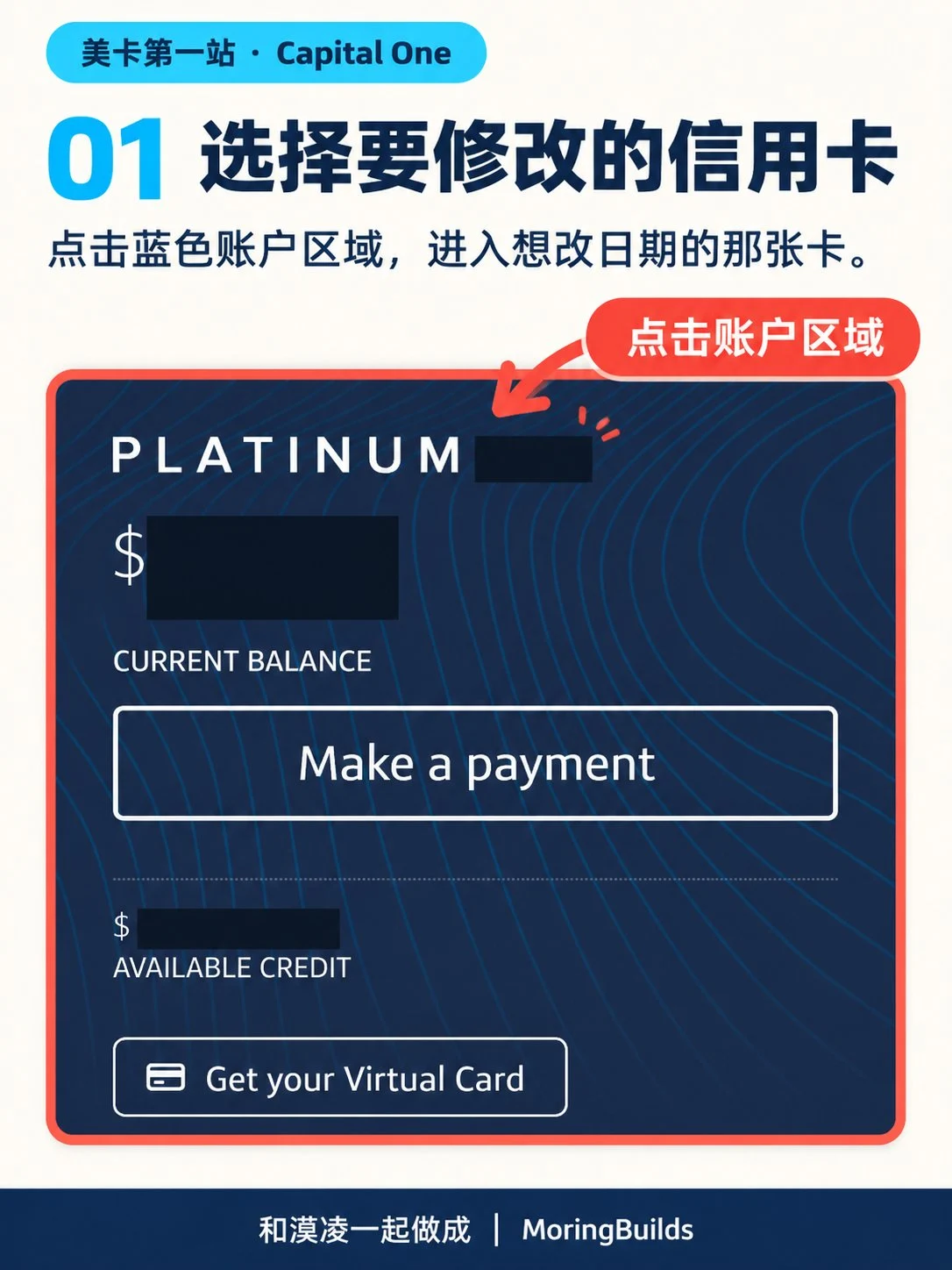
- Click the blue account area to open the credit card whose payment due date you want to change.
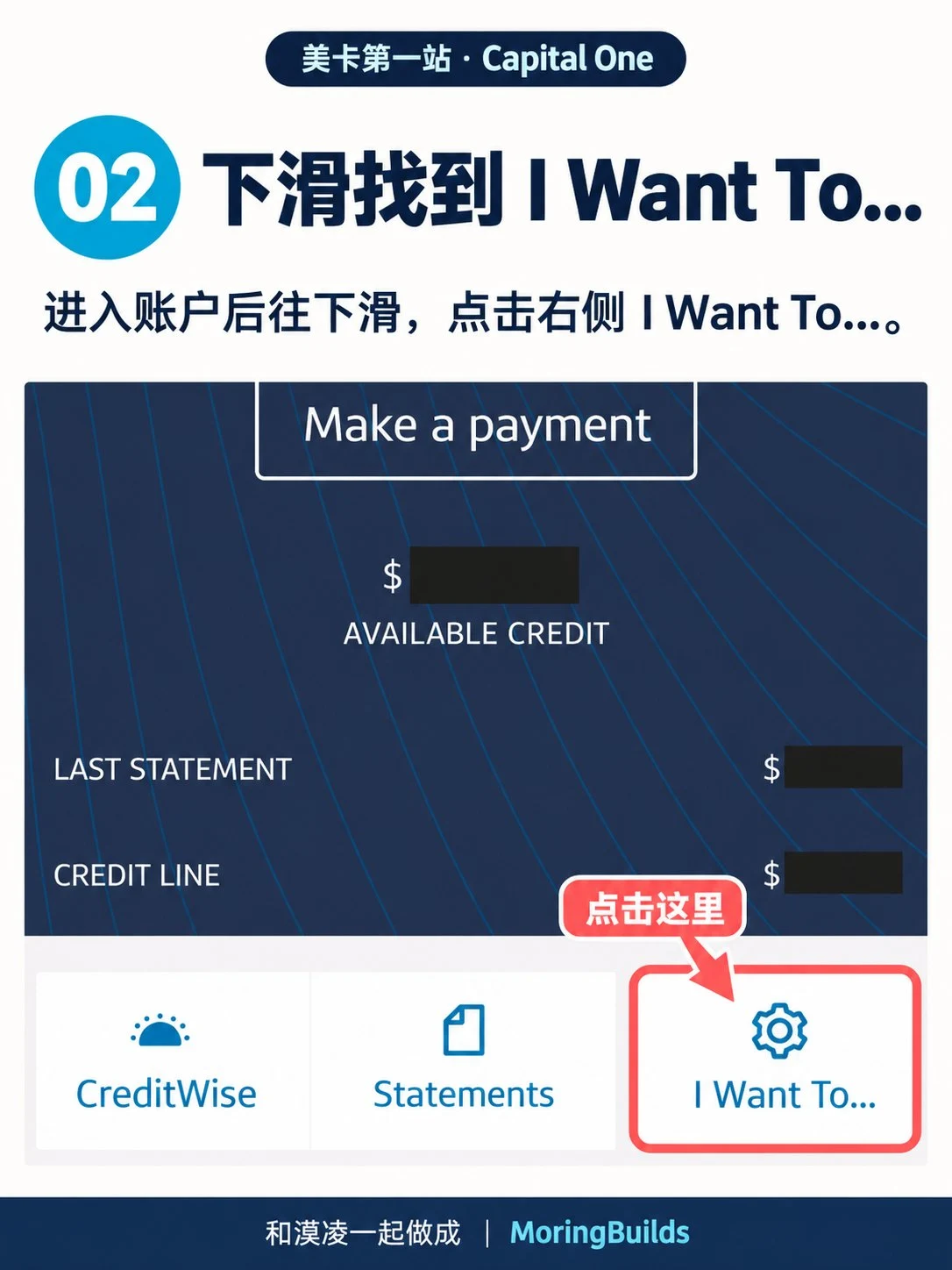
- Scroll down the account page and click I Want To....
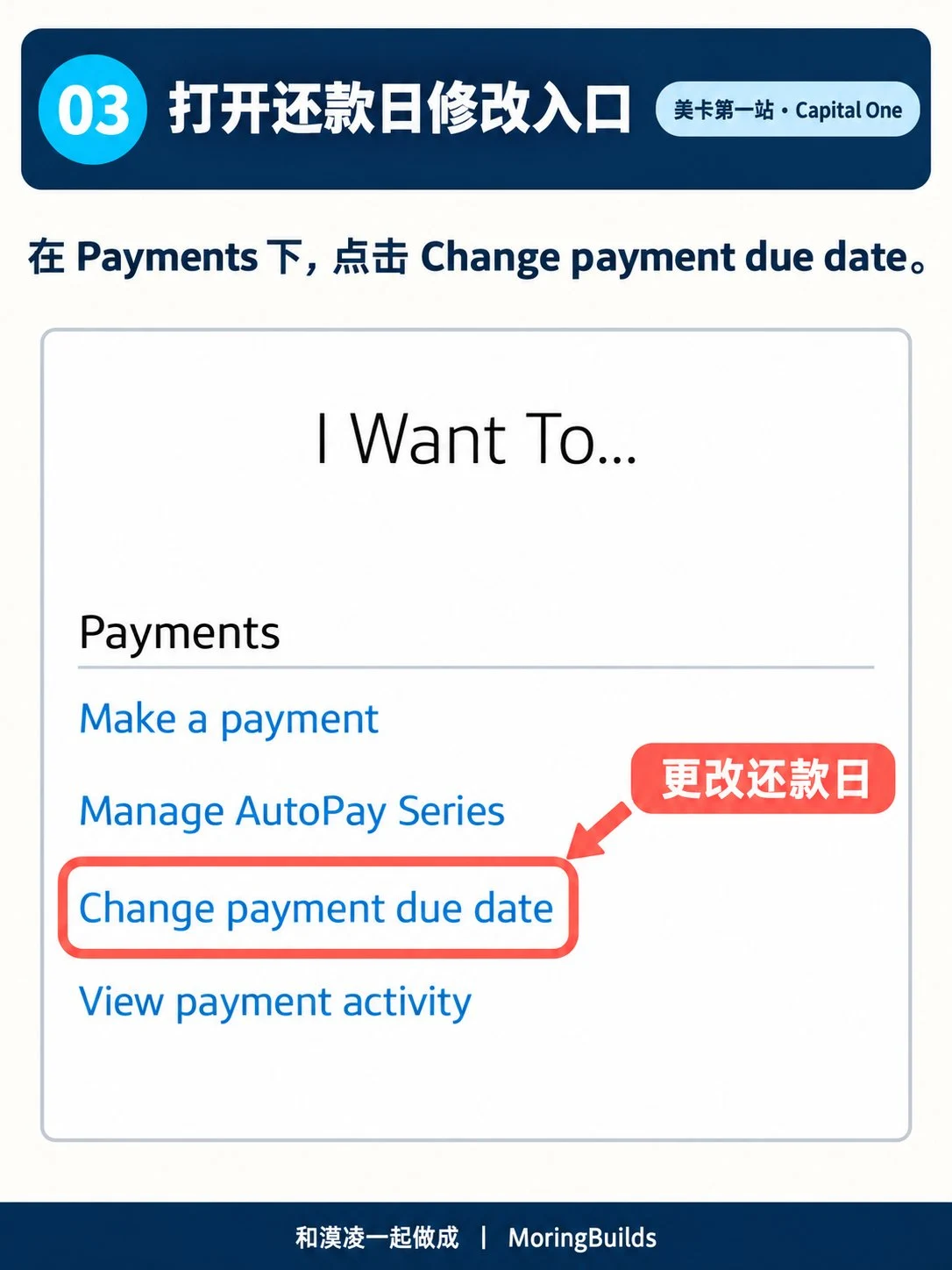
- Under Payments, click Change payment due date.
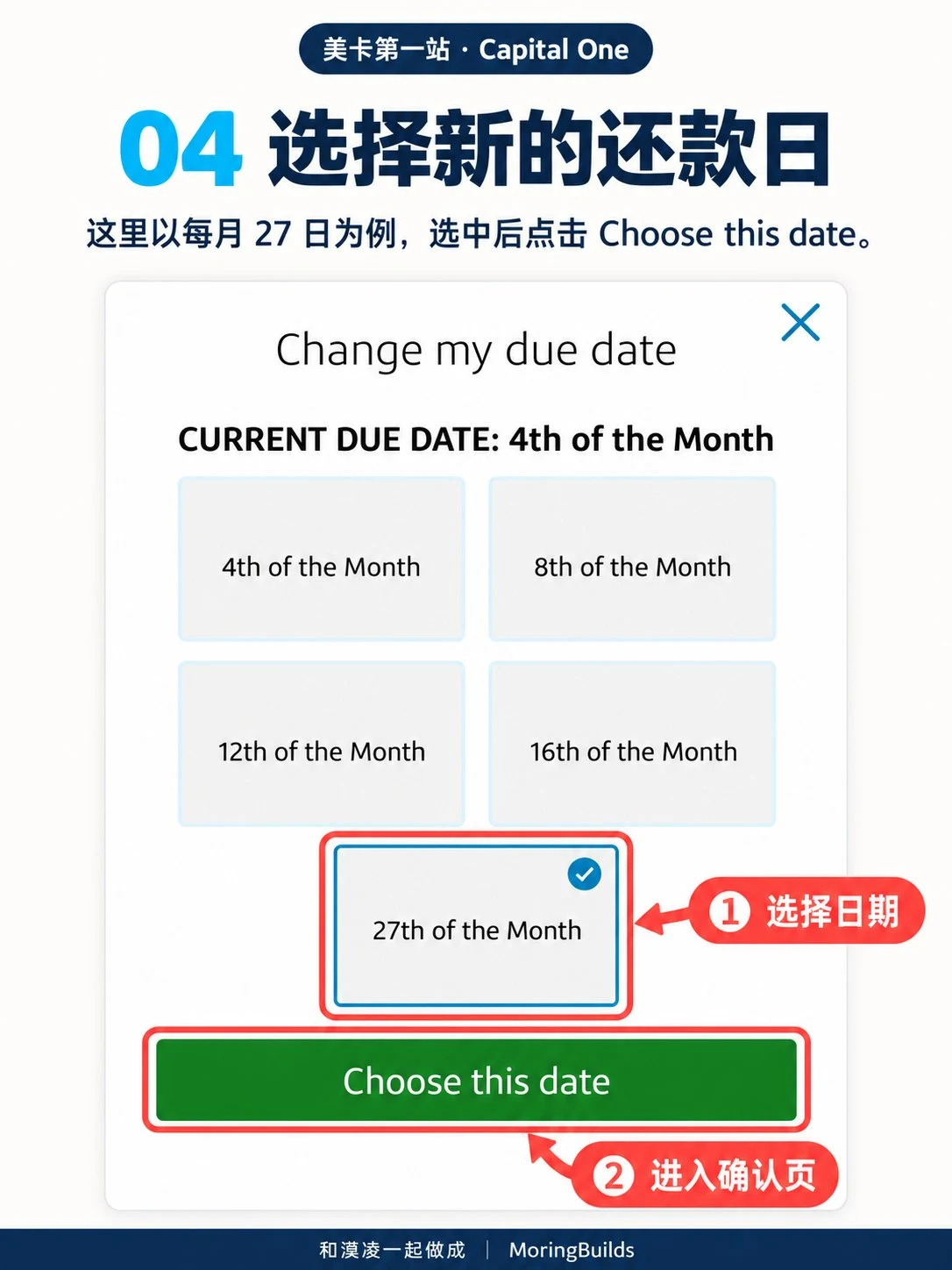
- Select a new date, shown as the 27th of each month in this example; click Choose this date.
- Review the new date and the information about when it takes effect, then click Change my due date to submit.
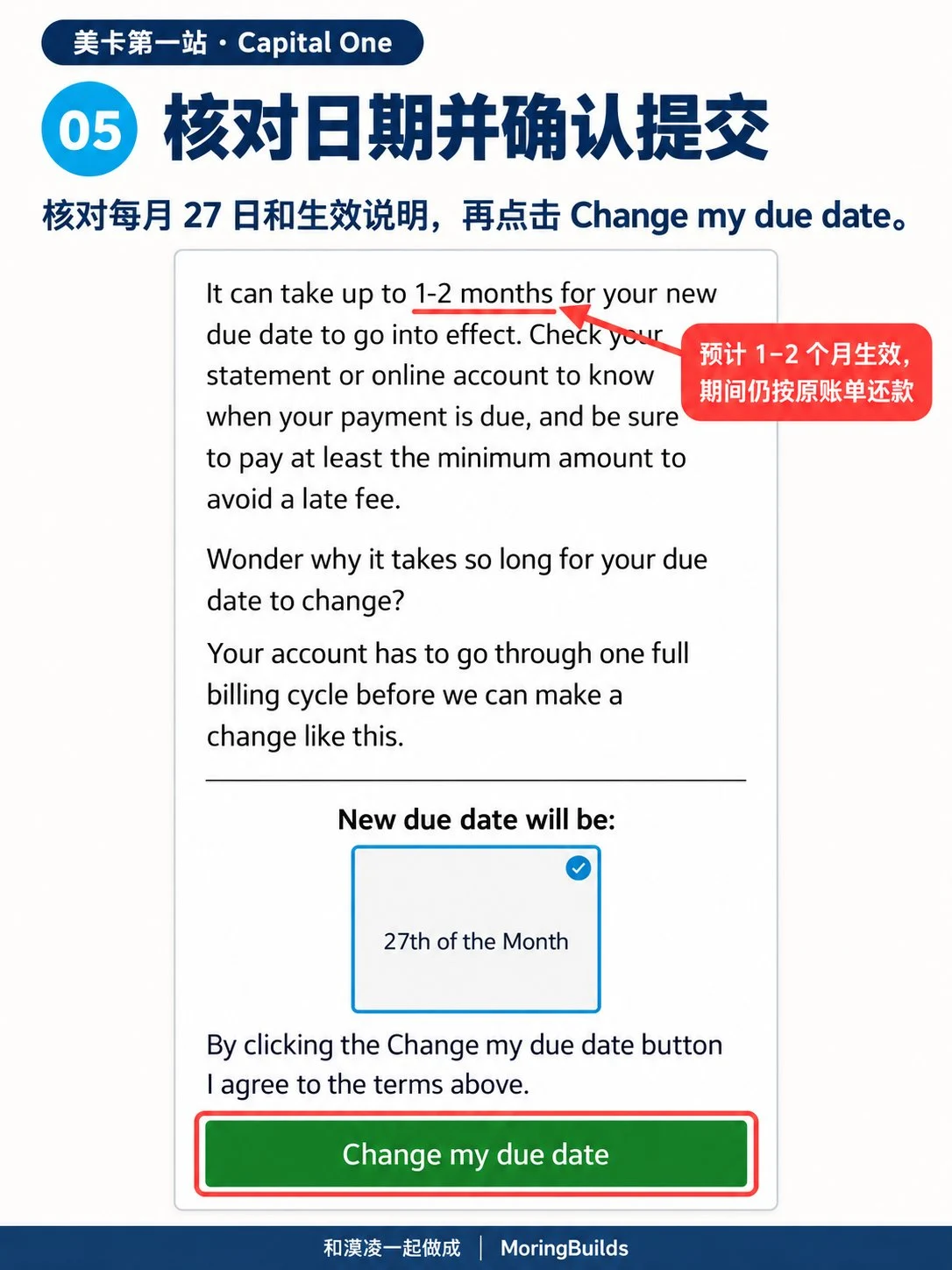
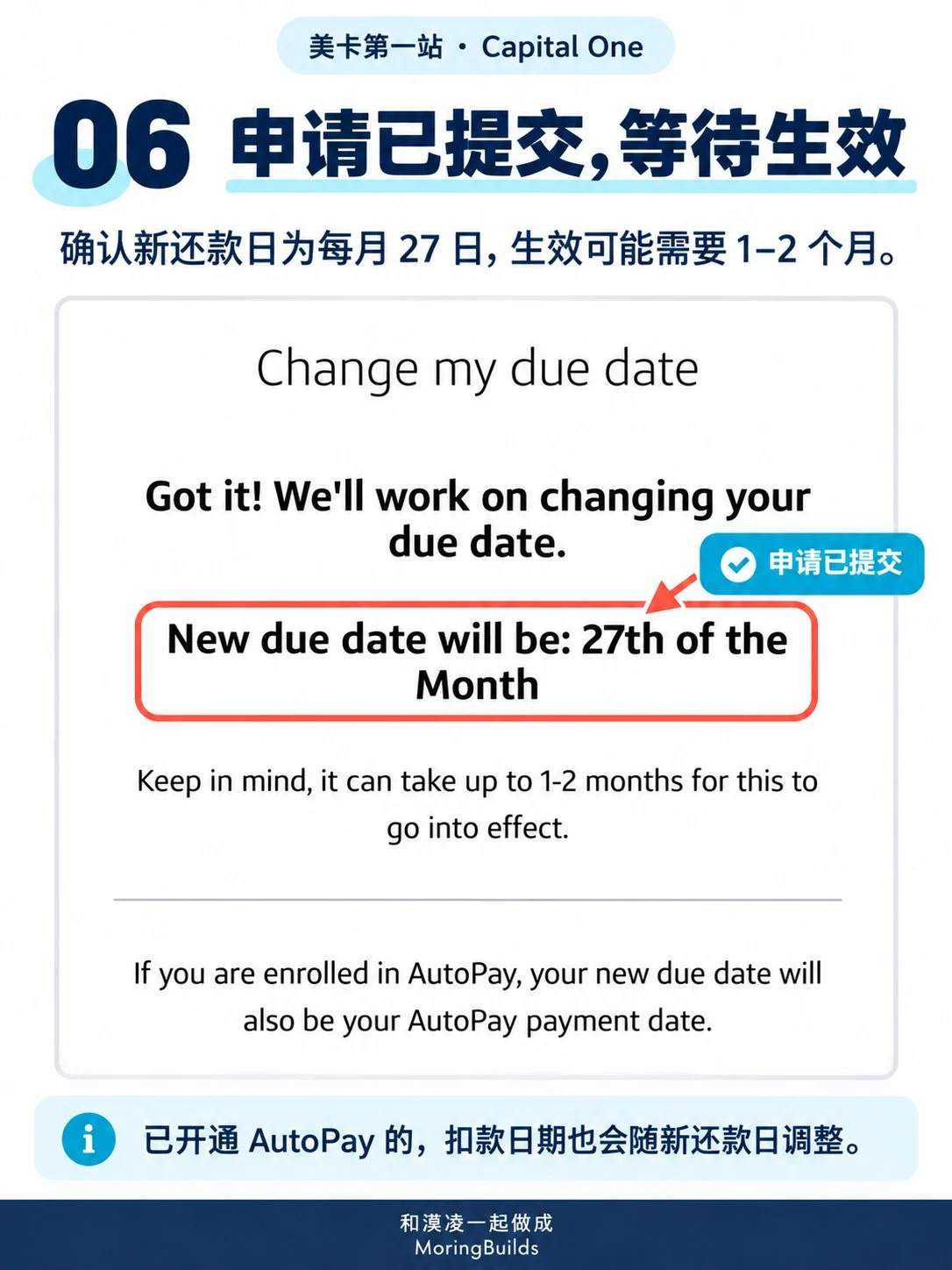
- Check the confirmation that your request has been submitted and allow 1–2 months for it to take effect; if AutoPay is enabled, the debit date will adjust to the new payment due date.
Below is a comparison chart of statement closing dates and payment due dates that the blogger estimated based on personal experience and information available online. Corrections are welcome.
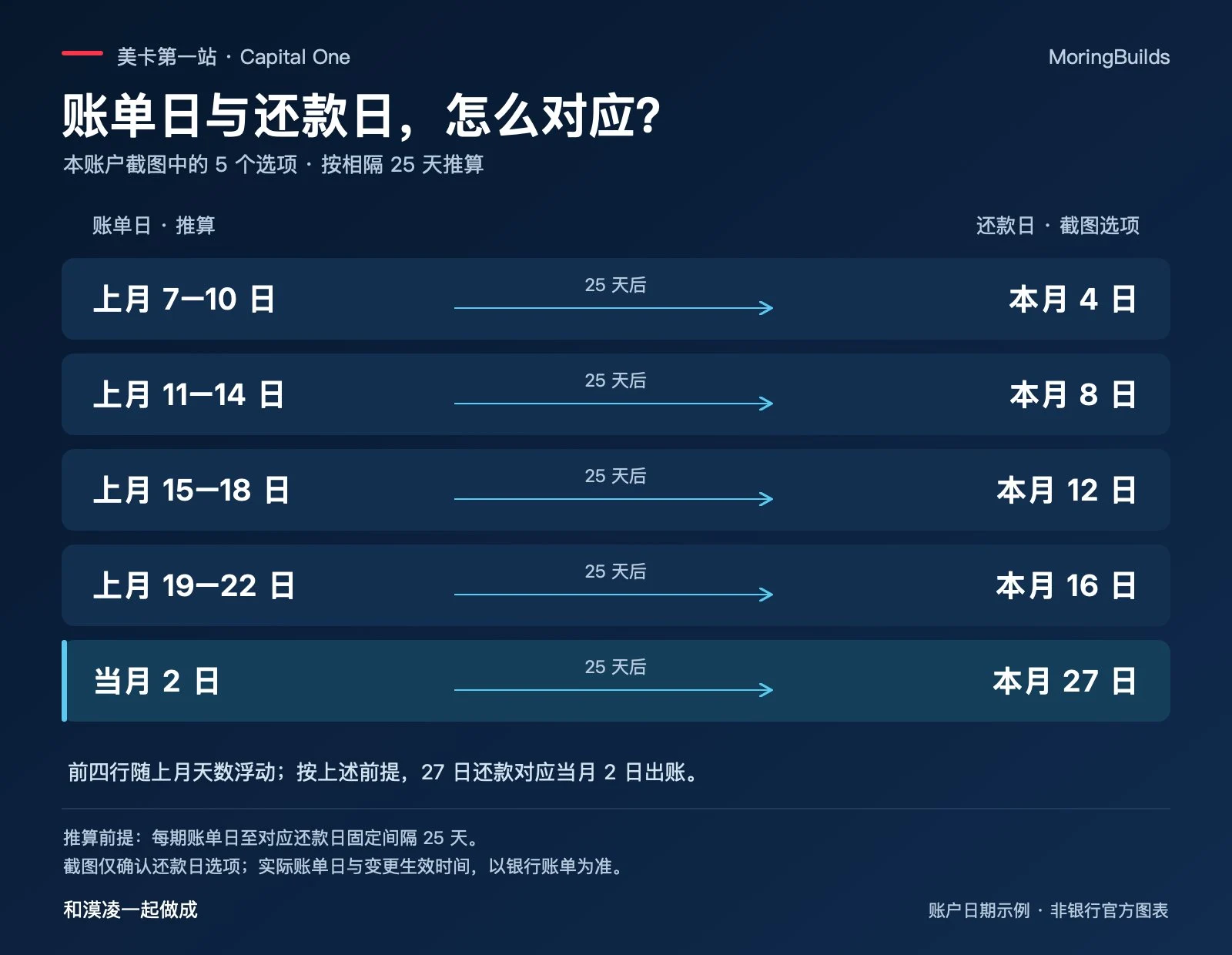
The dates you can choose depend on the options shown in your account. If the date you want isn’t listed, contact official customer service using the number on the back of your card to confirm the available arrangements.
For a newly approved card, if the option to change the date isn’t available yet or the system says you can’t make a change, you can also ask customer service directly: When can I request an adjustment for this account? When is my next payment due?
To change your statement closing date, explain your goal to customer service
The official online option is labeled as a payment due date change. If what you actually want to adjust is the end of your billing cycle, ask about both dates together.
You can say:
I'd like to change my payment due date. How would that affect my statement closing date?
This means: I want to change my payment due date. How will that affect my statement closing date?
If you would prefer your statement to be issued near the beginning of the month, you can add:
I'd prefer my statement to close near the beginning of the month. What options are available for my account?
This means: I’d like my statement to close as close to the beginning of the month as possible. What arrangements can I choose for this account?
You can start by explaining your goal, but the final dates should be based on confirmation from customer service and your subsequent statements. Once you see that your payment due date has changed successfully, keep checking that the statement closing date meets your expectations too.
After submitting your request, the transition period is the easiest thing to overlook
Capital One’s official payment help page currently states that a payment due date change takes about 4–6 weeks to take effect; another official help page says “within two billing cycles.” When making the change, check your account’s confirmation information and continue reviewing each statement.Payment due date information, Payment information for the transition period
For example, if your current statement originally requires payment on November 8 and you request a change to the 20th of each month, you cannot simply assume you can wait until November 20 to pay that current statement too.
If the original statement still shows November 8, pay by November 8.
After changing the date, check AutoPay again
If you already have AutoPay enabled, review the bank account used for payments, the next debit date, and the payment amount, then update your calendar reminders to help prevent forgotten payments or failed debits.
Capital One’s AutoPay supports options including the minimum payment, the last statement balance, and a fixed amount. For those using the card for everyday purchases who want to pay in full, look for Last Statement Balance (the balance from your previous statement), and make sure the bank account used for payments has sufficient funds. Paying only the minimum usually still results in interest charges; if your account is already accruing interest, watch for subsequent interest bills too.Capital One AutoPay information
When choosing a date, I recommend starting with your own cash flow: leave a little buffer after the date your funds usually arrive; if you already have several cards, you can also choose a time that makes it convenient to review your statements together.
After getting your first U.S. credit card, a habit worth building is to understand every statement, know how much you need to pay and by what date, and confirm that the payment has actually been credited to your account.
I’m Moring(漠凌). Let’s get the next thing done together.
References and When the Change Takes Effect
According to the Capital One Help Center, your new payment due date typically takes effect in the next billing cycle, which may take 4–6 weeks. Until the change takes effect, pay by the due date shown on your current statement. The dates in this article are estimates. Check your account for your actual dates.